
Global Policy Settings
Global Policies provide a centralized location where all predefined policies across multiple cloud providers—AWS, Azure, and GCP—are listed and managed. This page helps organizations apply standardized governance rules across their cloud environments, ensuring compliance, cost efficiency, and operational consistency.
Overview
Global Policies are organization-wide policy templates that Workspace Admins can configure to enforce governance across all projects. By marking policies as Mandatory or Optional, administrators control whether policies are enforced automatically or available for project-level adoption.
Key benefits: - Standardize governance rules across all cloud providers - Enforce compliance policies organization-wide - Allow flexibility for project-level customization where appropriate - Ensure consistent cost optimization and security practices
Accessing Global Policy Settings
- Navigate to Admin Settings from the main menu
- Select Policy Settings
- You will see a list of all available global policies
Note: Only Workspace Admin roles have access to Global Policy Settings. See RBAC for role details.
Policy Settings Page
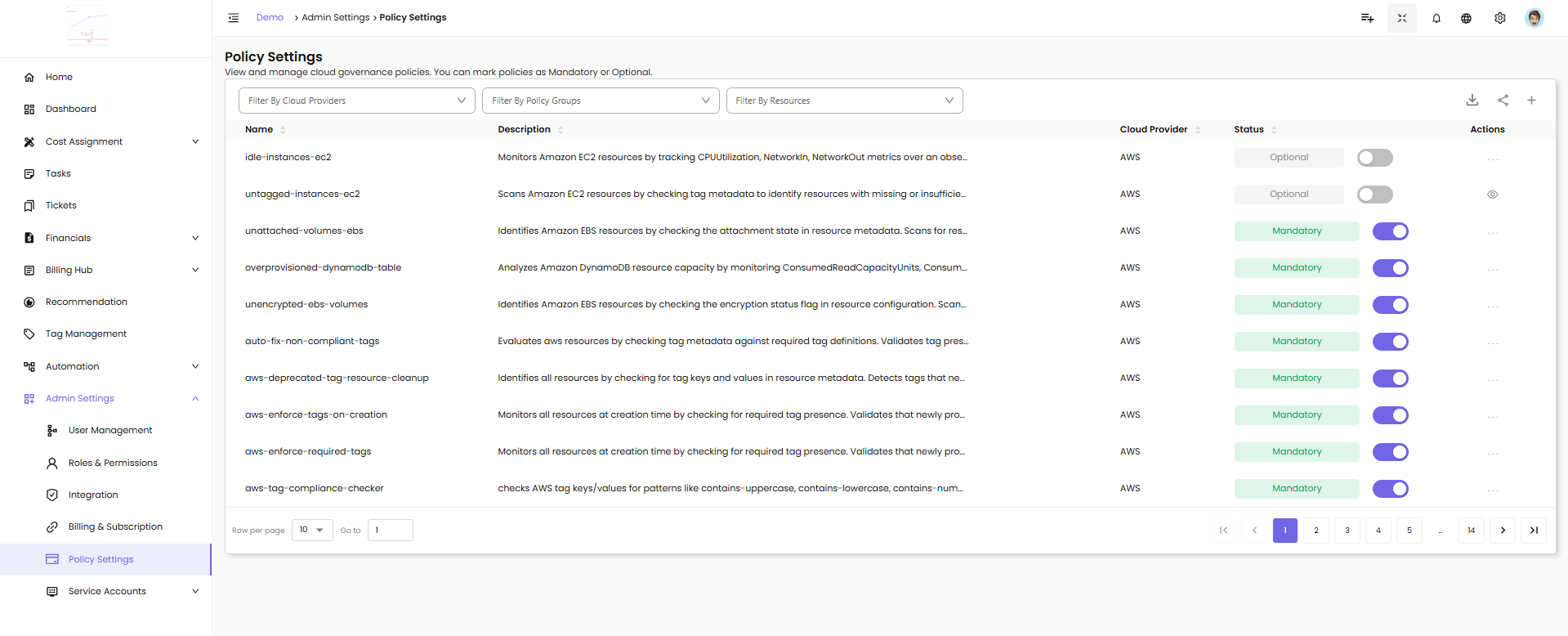
The Policy Settings page displays all predefined policies available in CloudPi.
Filters
Use filters to find specific policies:
- Filter By Cloud Providers - Filter policies by cloud provider (AWS, Azure, GCP)
- Filter By Policy Groups - Filter by policy group category
- Filter By Resources - Filter by specific resource types
Policy List Columns
Name - Policy identifier (e.g., idle-instances-ec2, untagged-instances-ec2, unattached-volumes-ebs)
Description - Brief description of what the policy monitors or enforces
Cloud Provider - The cloud platform (AWS, Azure, GCP)
Status - Policy enforcement status:
- Mandatory (green badge with toggle ON) - Policy is enforced across all projects
- Optional (grey badge with toggle OFF) - Policy can be enabled at project level
Actions - Menu for additional policy options
What You'll Find on the Global Policies Page
- A comprehensive list of built-in policies, categorized by cloud provider (AWS, Azure, GCP)
- Each policy includes metadata like name, classification (e.g., cost, security, optimization, governance), and a description of what it enforces
- Toggle controls to set each policy as Mandatory or Optional
Controlling Policy Behavior: Mandatory vs. Optional
From the Global Policies page, Workspace Admins can decide how each policy should behave across the organization:
Mandatory Policies
Mandatory - These policies are enforced by default and cannot be overridden at the project level. They apply to all relevant resources without exception.
When to use Mandatory: - Security and compliance requirements that must apply organization-wide - Cost governance policies that enforce spending controls - Tagging standards required for all resources - Critical governance rules with no exceptions
Example: Enforcing encryption on all storage resources, requiring specific tags on all cloud resources, or blocking unattached volumes older than 30 days.
Optional Policies
Optional - These policies are available for project-level users to adopt but are not enforced unless explicitly enabled for a given project.
When to use Optional: - Optimization policies that teams can enable based on their needs - Best practice recommendations that may not apply to all projects - Policies where project teams should decide based on their workload characteristics
Example: Idle instance detection for development environments, backup scheduling preferences, or cost allocation rules specific to certain teams.
Flexibility and Balance
This flexibility allows teams to strike a balance between organization-wide controls and project-level customization. Mandatory policies ensure critical governance, while Optional policies empower teams to adopt best practices that fit their specific needs.
Common Global Policy Examples
Cost Optimization Policies
- Idle Instances - Detects EC2, VMs, or compute instances with low utilization
- Unattached Volumes - Identifies storage volumes not attached to any instance
- Unused Public IPs - Finds public IP addresses with no associated resources
Security and Compliance Policies
- Unencrypted Resources - Scans for storage or databases without encryption
- Public Access Detection - Identifies resources with public internet exposure
- Deprecated Services - Flags resources using deprecated or EOL services
Governance Policies
- Untagged Resources - Finds resources missing required tags
- Tag Compliance - Validates tag values against required patterns
- Resource Naming Standards - Enforces naming conventions
Financial Policies
- Budget Alerts - Monitors project spending against budget thresholds
- Cost Anomaly Detection - Identifies unusual spending patterns
- Chargeback Validation - Ensures proper cost allocation
Managing Global Policies
Setting a Policy to Mandatory
- Locate the policy in the Global Policies list
- Click the toggle switch in the Status column
- The policy changes to Mandatory (green badge)
- The policy is now enforced across all projects automatically
Setting a Policy to Optional
- Locate the policy in the Global Policies list
- Click the toggle switch in the Status column to turn it off
- The policy changes to Optional (grey badge)
- Projects can now choose to enable or disable this policy individually
How Global Policies Affect Projects
For Mandatory Policies
When a global policy is set to Mandatory: - It appears in all project Policy and Workflow pages - It is automatically Active and cannot be disabled at the project level - Workflows can be configured at the project level to define actions when the policy triggers - Project users cannot toggle the policy off
For Optional Policies
When a global policy is set to Optional: - It appears in all project Policy and Workflow pages - It is Inactive by default - Project Admins can toggle it on for their specific projects - Each project can independently enable or disable the policy
Best Practices
- Start with critical policies as Mandatory - Security, compliance, and essential cost controls
- Make optimization policies Optional - Allow teams to adopt based on their needs
- Review policy settings quarterly - Adjust Mandatory/Optional settings as governance needs evolve
- Communicate policy changes - Notify project teams when global policy settings change
- Use descriptive names - Ensure policy names clearly indicate what they enforce
- Document exceptions - If certain projects need exceptions, document the business justification
Related Pages
- Policies & Workflows - Configure project-level policies and workflows
- RBAC - Understand role permissions for policy management
- User Management - Manage users who can configure global policies
- Admin Settings - Other administrative configuration options