
Admin Settings
Admin Settings in CloudPi provides centralized configuration and management of your workspace, including user management, role-based access control, integrations, service accounts, and billing & subscription.
Overview
The Admin Settings section is accessible from the header navigation and includes the following modules:
- User Management - Manage users and their access
- Roles & Permissions - View role definitions and permissions
- Integration - Connect with ticket providers, SSO, and SMTP
- Billing & Subscription - View and manage your subscription
- Policy Settings - Configure workspace policies
- Service Accounts - Manage cloud provider credentials (MSA & PSA)
User Management
The User Management module lets workspace administrators invite, view, edit, and remove users.
For the full lifecycle (invite → activate → edit → remove), the new Invite User dialog, edit-permission rules, and the Local vs SSO authentication choice, see the dedicated User Management page.
Roles & Permissions
The Roles & Permissions module shows the role definitions and the capability matrix for each role in the workspace.
For the six CloudPi roles, what each role can see and do, the per-page screenshots, and the editing authorisation matrix, see Role-Based Access Control.
Integration
CloudPi supports integration with ticket providers, SSO, and SMTP for enhanced workflow automation and user management.
For detailed integration documentation, see Integration.
Available Integrations
Ticket Providers - Azure DevOps for work item management and ticket creation from recommendations
SSO (Single Sign-On) - Enable users to log in using organizational identity providers with PKCE support
SMTP - Configure email notifications from your CloudPi environment
Integration Status
Each integration displays its connection status:
Active - Provider is connected and active
Connected - Provider is linked to CloudPi
Not Connected - Provider needs configuration
Billing & Subscription
View and manage billing details, subscription plans, and payment history. Monitor usage, update payments.
Navigating to Billing & Subscription
Navigate to Admin Settings > Billing & Subscription to access subscription management.
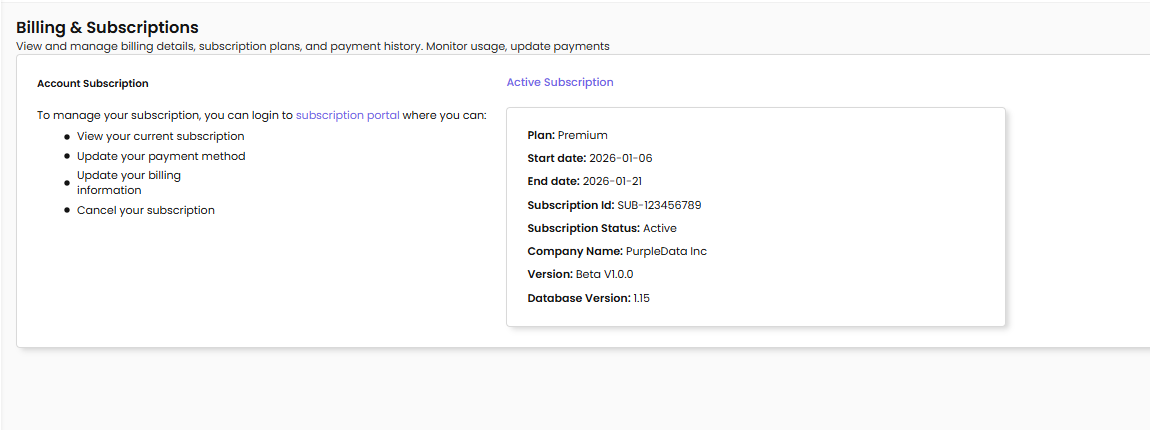
Account Subscription
Active Subscription - Displays the current status of your subscription
To manage your subscription, you can login to subscription portal where you can:
- View your current subscription
- Update your payment method
- Update your billing information
- Cancel your subscription
Active Subscription Details
Plan - Your current subscription tier (e.g., Premium)
Start date - When your subscription period began (e.g., 2026-01-06)
End date - When your subscription period ends (e.g., 2026-01-21)
Subscription Id - Unique identifier for your subscription (e.g., SUB-123456789)
Subscription Status - Current status of the subscription (e.g., Active)
Company Name - The company name associated with the subscription (e.g., PurpleData Inc DBA Cloudpi)
Version - The current CloudPi version (e.g., Beta V1.0.0)
Database Version - The database version in use (e.g., 1.15)
By effectively utilizing the Billing & Subscription features, you can ensure that your cloud cost optimization efforts are well supported by an appropriate and up-to-date subscription plan.
Policy Settings
Configure workspace-level policies for automation and governance.
For detailed policy documentation, see Automations.
Service Accounts
Service Accounts enable secure connectivity between CloudPi and your cloud providers (AWS, Azure, GCP).
For detailed service account documentation, see Service Accounts.
Account Types
Master Service Account (MSA) - Domain-level credentials shared across multiple projects within an organization
Project Service Account (PSA) - Project-level credentials with own credentials or inherited from an MSA
Service Types
Collector - Standard data collection and resource inventory
Billing - Billing and cost data collection
Metrics - Performance metrics collection
Remediation - Write operations for automated actions
Permissions Summary
| Feature | Workspace Admin | Workspace User | Project Admin | Project User |
|---|---|---|---|---|
| User Management | Full Access | View Only | Project Users | View Only |
| Roles & Permissions | View All | View Assigned | View Assigned | View Assigned |
| Integration | Full Access | View Only | View Only | Use Only |
| Billing & Subscription | Full Access | View Only | No Access | No Access |
| Policy Settings | Full Access | View Only | View Only | No Access |
| Service Accounts | Full Access | View Only | Project PSAs | View Only |