Forecast
The Forecast module helps you proactively manage cloud budgets by tracking allocated budgets, forecasts, and actual spend across projects. It provides a month-wise breakdown and lets you request and approve forecast changes.
Forecast Summary Cards
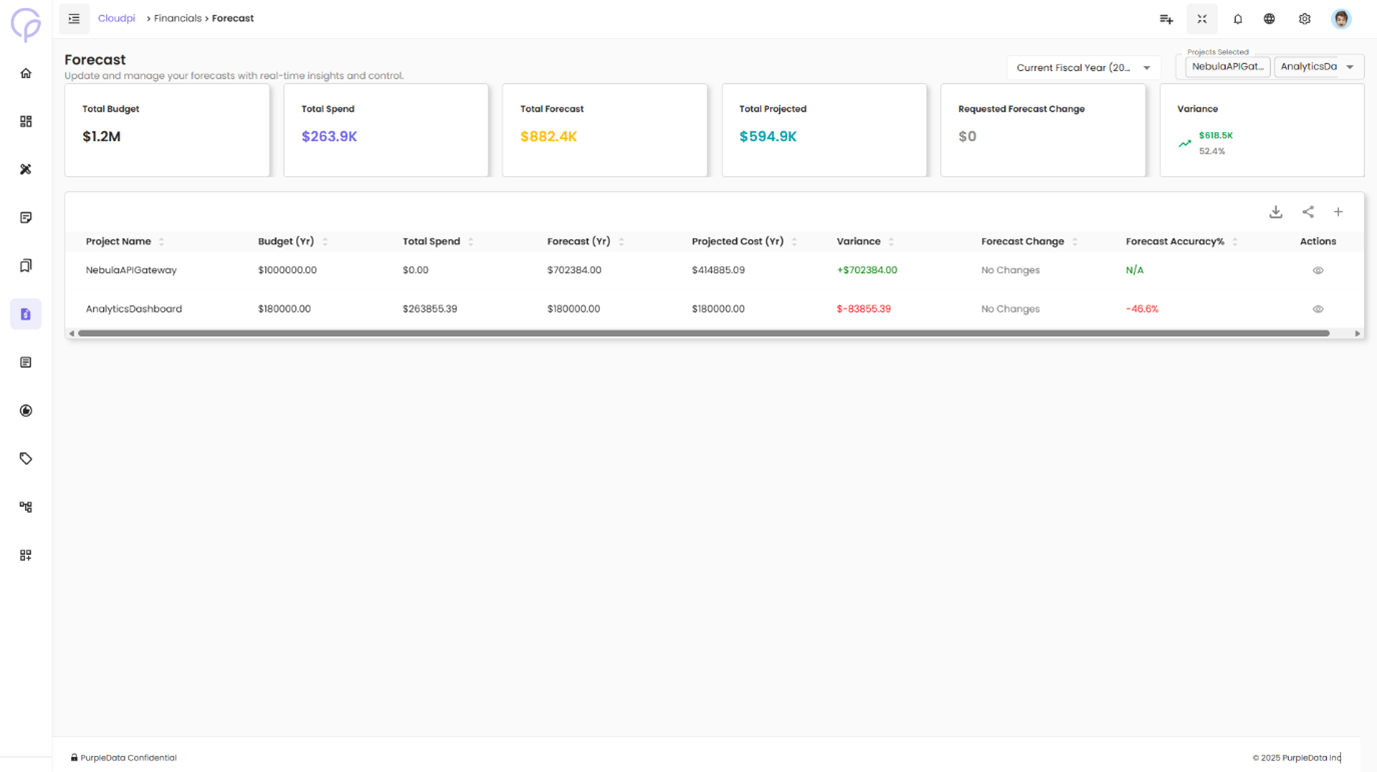
At the top of the Forecast page, high-level metrics give instant visibility into how your organization is tracking against budget:
- Total Allocated Budget — Total budget assigned across all projects
- Total Budget Spend — Actual cloud spend to date
- Total Forecast — Sum of forecasted costs for all projects
- Total Projected — Placeholder for projected spend (currently $0)
- Requested Forecast Change — Total forecast change currently under review
- Variance — Difference between budget and actual spend (negative values indicate overspending)
Forecast Table Overview
Below the summary cards, a table lists all active projects.
| Column | Description |
|---|---|
| Project Name | Name of the cloud project (e.g., CPDev, NPDDev) |
| Budget (Yr) | Total yearly budget allocated |
| Forecast (Yr) | Total forecast amount for the year |
| Forecast Change | Status indicating whether any forecast modifications were requested |
| Start Date | When the budget period begins |
| Actions | Options to view detailed monthly forecast data and submit change requests |
You can also use filters and pagination to find specific projects.
Viewing Forecast Details
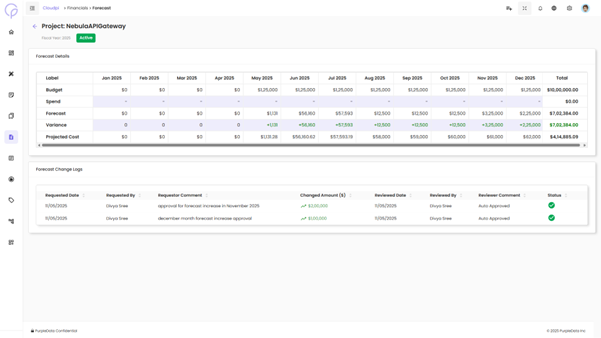
Click the ellipsis icon (···) under Actions for a project and select View Forecast. The row expands and displays detailed forecast data for each month.
The detailed forecast section shows:
| Field | Description |
|---|---|
| Budget | Monthly allocation based on the total annual budget |
| Spend | Actual cloud spend for each month |
| Forecast | Current monthly forecast values |
| Variance | Difference between forecast and spend. Positive variance is shown in green; overspending is shown in red |
| Requested Change | Any pending forecast change requests |
| New Forecast ($) | Updated forecast values that will apply once the change is approved |
At the far right, the Total column aggregates each row's data for the year.
Editing Forecasts
A Project Admin can submit a forecast change by editing the New Forecast ($) field and providing a reason. After clicking Save Forecast, the change request is sent for approval.
Forecast Approval Workflow
Once a forecast change is submitted:
- Workspace Admins/Users receive a notification to review the request.
- They can either Approve or Reject the change.
- A comment or reason is required for any approval or rejection.
- Once approved, the forecast is updated and reflected in both the table and the summary metrics.
Change Logs Tab
Alongside the Forecast Changes tab, the Change Logs tab records the entire history of forecast changes.